Native integration
with Worlde.
Four Worlde controllers with native integration in SYNZ Studio: SYNZ recognizes them the moment you plug them in and gives each its own module, with the device drawn just as it is and every control already mapped. What you play lights up on the drawing, and everything can be changed.
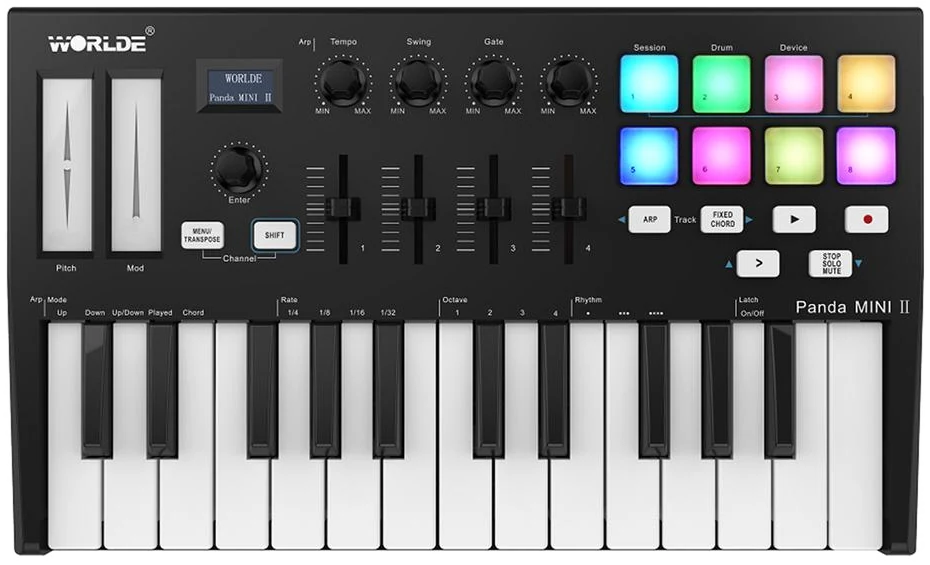
Panda MINI II
A 25-key keyboard with 8 pads, 4 knobs, 4 sliders and two touch strips. SYNZ recognizes it when you plug it in and gives it its own module, My Panda: the device drawn as it is, with what each control does, lighting up as you play.
- Pads — they play the drums; velocity sensitive in the Panda's Drum mode.
- Four knobs — cutoff, attack, release and glide.
- Four sliders — the faders of the mixer tracks, four at a time: the > button moves to the next four.
- Transport — ▶ is Play, ● is Rec and STOP/SOLO/MUTE is Stop.
- Touch strips — pitch bend and modulation.
- Everything can be changed — with Learn you move a control on the device and SYNZ keeps its message.
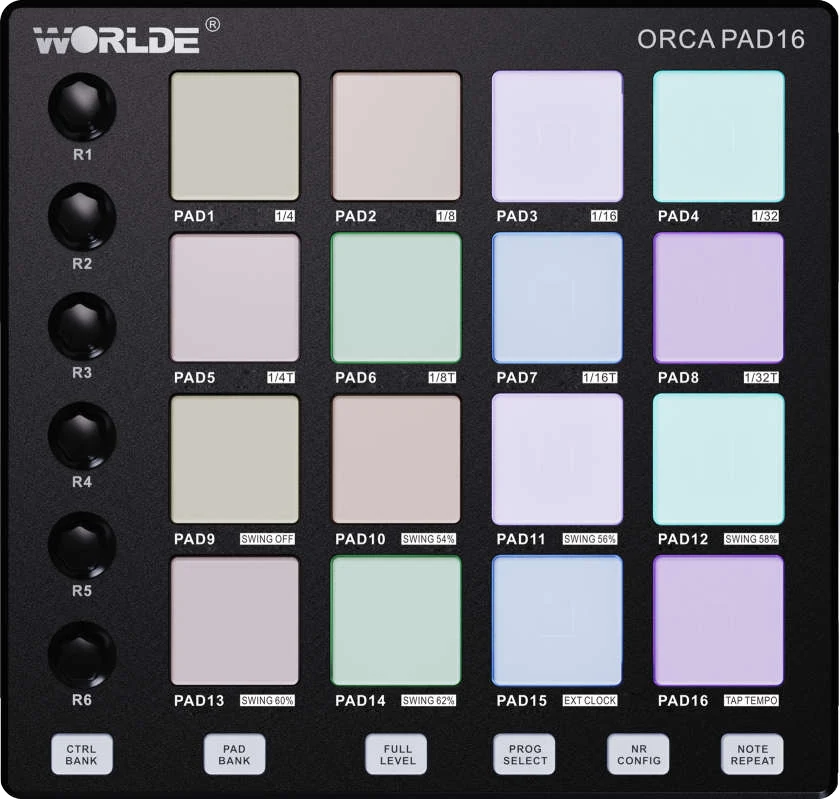
Orca Pad 16
A 16-pad controller with six knobs and three banks. In SYNZ you pick its model in Controllers and it gets its own module, My Orca Pad: the pads and knobs light up as you play, with what each pad does under NR CONFIG.
- Three banks, three pages — green, red and blue play the Pad Rack, and the Pad Rack changes page with the bank, each with its own kit and changes.
- Pads — the 16 pads play the Pad Rack, kick at the bottom left, and it opens by itself with its kit when you plug it in.
- Six knobs — the Pad Rack’s Reverb, Delay, Cathedral, Echo ∞, Tunnel and DJ Filter.
- Repeat — a held pad repeats at the project tempo (1/8, 1/16 or 1/32), with the Pad Rack’s repeat.
- Clock — if you turn it on, SYNZ sends it its MIDI clock so the device’s Note Repeat and swing keep time.
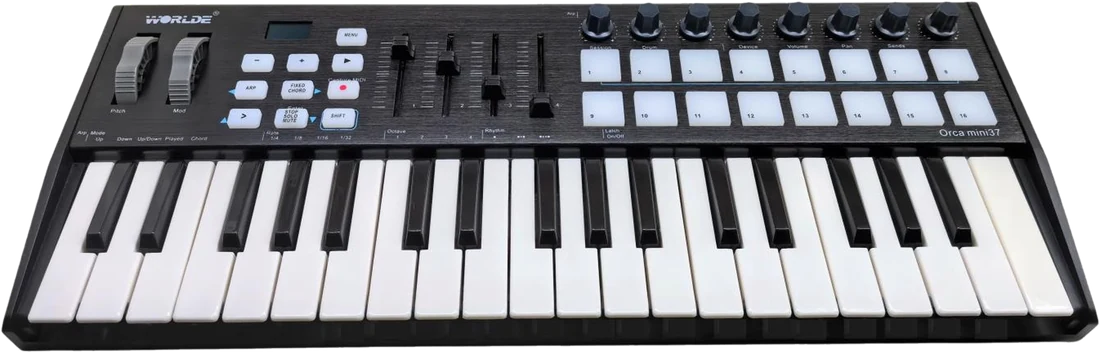
Orca mini 37
A 37-key keyboard with 16 RGB pads, eight knobs and four sliders. In SYNZ you pick its model under Controllers and it gets its own module, My Orca mini 37: the device drawn with what every control does, and SYNZ lights up its pads and buttons.
- Three modes on the > button — Pads, Steps and Mix; the device’s button moves from one to the next and its colour tells you which one you’re in.
- Pads — the 16 pads play the drums, one colour per piece (kick, snare, toms, crash, ride and hi-hat), and light up white when you hit them.
- Steps — the 16 pads are the steps of the Beat Seq row: you see the strong step, the soft one and the one playing. Knob 1 picks the row, 2 the page and 3 the bank.
- Mix — the top pads pick a row and the bottom ones mute it. The knobs carry Reverb, Delay, Volume or Pan of the rows, and the sliders choose which.
- ▶ and ● — ▶ toggles play and stop, and ● records; they light up green while playing and magenta while recording.
- What it doesn’t send — ARP, FIXED CHORD, STOP/SOLO/MUTE, SHIFT, MENU and +/− are internal at the factory: they send nothing over MIDI.
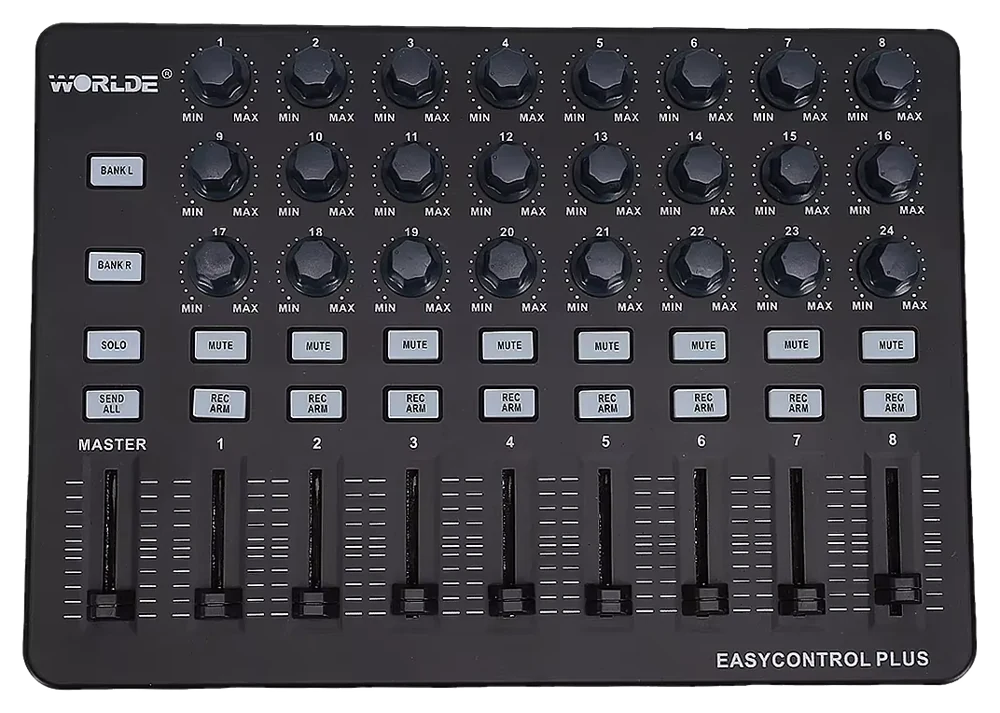
Easy Control Plus
An 8-channel mixing controller with 24 knobs, 9 faders and MUTE and REC ARM buttons. In SYNZ you pick its model in Controllers and it gets its own module, My Easy Control: each channel shows the mixer track it controls and everything moves with what you touch.
- Eight faders and the master — the volume of eight mixer tracks and the master’s, with no jumps: the value follows the fader from the first move.
- Twenty-four knobs — three per channel: pan and the sends to the first two returns.
- MUTE and REC ARM — each channel mutes its track or arms it for recording.
- Its own module — the device drawn with each track’s name, with the knobs and buttons lighting up as you touch them.
Open SYNZ Studio in your browser, plug in your controller and it shows up in the library. Nothing to install.